
For treatment courts, probation, parole, and pretrial services
Check meeting requirements without collecting court cards
Drug, DUI, veterans, and other treatment courts often require AA, NA, or other recovery meetings, and so do many supervision terms. With MeetingSlip, participants check in with their phone at each meeting. Your team sees verified attendance against each person's requirement before staffing or the next office visit.
No paper slip to keep track of, no chair signature. The meeting never learns why someone is there.
A court card is a signature on a sheet of paper
Many courts and supervision offices ask participants to bring a card or sheet signed by each meeting's chair or secretary. Staff collect the cards, count the signatures, and enter the totals before staffing.
- Collecting cards at office visits and hearings, then chasing the ones that didn't come in.
- Counting signatures by hand and typing totals into the case management system.
- No way to tell a real signature from one added later, or whether the person arrived on time and stayed.
- Each meeting group decides for itself whether to sign cards, and some won't.
MeetingSlip makes the record at the meeting, from the participant's own phone, confirmed with Face ID and signed by our server.
How it works for your team
-
Give each participant a pairing code
In the MeetingSlip portal, add a participant and set how many meetings a week they need, from 1 to 21. You get a code and a QR code. The participant enters it in the free MeetingSlip app. A code works once and expires after 7 days.
-
They verify their government ID once
Before anything is shared with you, the app checks a driver's license, state ID card, or passport against a live selfie. The check counts for two years.
-
They check in at each meeting
At an in-person meeting, they tap Check in within 200 meters of the meeting's address, from 15 minutes before it starts to 30 minutes after. Face ID, Touch ID, or a fingerprint confirms each check-in and check-out. No paper slip to keep track of, no chair signature.
-
See progress against the requirement
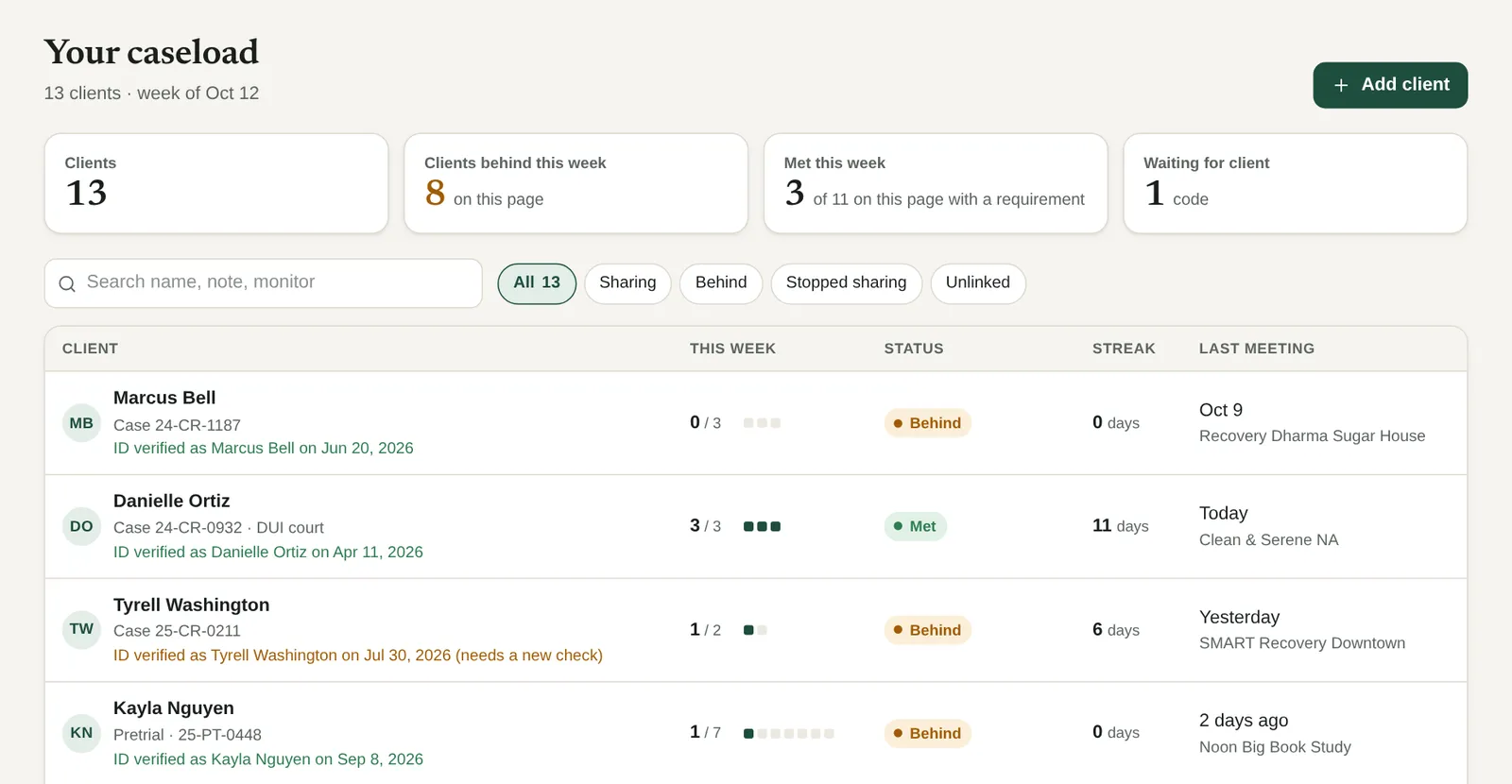
The caseload shows each participant's meetings this week against their number, marked Met, On track, or Behind. Open anyone for their signed records, a 12-week calendar, and a signed PDF report for any dates.
Optional emails tell you about each check-in or missed days, or send a weekly or monthly summary. Several staff can share one account, and you can move a participant from one staff member to another.
Government ID verification for every participant you see
Before a participant can share with you, MeetingSlip checks their government ID. So the records on your caseload come from the person named on them, not just from a phone.
A photo of the ID
A driver's license, state ID card, or passport.
A live selfie
Taken on the spot and matched to the photo on the ID.
Shown on your caseload
"ID verified as" the name on the ID, with the date. Every record made after the check says so too.
The check counts for two years, and the caseload flags anyone who needs a new one. Face ID or a fingerprint then ties each check-in to the phone's enrolled owner, and our server's clock and the phone's location tie it to the meeting.
✓ ID verified
Jordan Ellis
ID verified as Jordan Ellis on Oct 1, 2026
A government ID matched to a live selfie. A new check is due after two years.
What a record shows, and what it doesn't
Every record lists the same limits on its public verify page, so anyone who reads it knows them too.
A record shows
- Our server recorded the check-in and check-out times with its own clock, not the phone's.
- The phone was within 200 meters of the meeting's listed address at each step, after allowing for GPS accuracy.
- Check-in happened between 15 minutes before and 30 minutes after the scheduled start.
- How long they stayed. A stay of at least 75% of the scheduled meeting counts as full attendance.
- The phone's enrolled owner unlocked it with Face ID or a fingerprint at check-in and check-out.
- Whose government ID was verified, and when.
- That no one has changed the record since. Each record is signed and can only be added to.
It does not show
- Whose face or fingerprint was added to the phone before the person set up MeetingSlip. The ID check ties them to their ID, but it can't see what else is enrolled on the phone.
- That they took part in the meeting or stayed in the room. MeetingSlip verifies presence near the location, not participation.
- That the phone's GPS wasn't faked in a way the phone didn't report. Reported fake locations are refused.
- That the meeting took place as listed. Meeting details come from the SobaSearch directory.
Anyone can check a record or report at meetingslip.com/verify with its code or QR code. No account needed.
Each court decides how to use it
MeetingSlip doesn't decide what a court accepts. Each judge, court, and supervising agency decides how to use these records, and whether they replace or sit beside the cards you use now.
To help you decide, every record lists what it shows and what it doesn't, in plain words, on a public page anyone can open with the record's code. A pilot is a good way to compare the two side by side.
Privacy for participants
Participants share with you because you ask them to. Here is what sharing with you does and doesn't reveal.
- The participant chooses to share with you and can stop at any time. Your caseload shows when someone stops sharing.
- The meeting never learns why they're there. No one at the meeting signs or sees anything, and MeetingSlip collects nothing about other people in the room.
- Location is read only while the app is open. MeetingSlip saves one reading at check-in and one at check-out.
- The app's name, icon, and notifications never mention a program or recovery.
- Participants can see who on your team opened their records, and when.
- MeetingSlip never keeps ID photos, ID numbers, or full dates of birth.
- The app and the ID check are free for participants.
Questions
Will a judge accept these records?
We can't promise that. Each court and agency decides for itself. Every record and report has a public verify page that lists what it shows and what it doesn't, and links to our public signing keys so anyone can check the signature.
Could someone check in from the parking lot?
Check-in works within about 200 meters of the meeting's listed address, so a record shows the phone was near the meeting, not inside the room. The record also shows the check-in and check-out times and how long they stayed. Full attendance means at least 75% of the scheduled meeting.
Could someone check in with another person's phone?
Each check-in and check-out needs Face ID, Touch ID, or a fingerprint from the phone's enrolled owner, and the participant's government ID is checked against a live selfie before they share with you. MeetingSlip can't see whose face or fingerprint was added to the phone before the participant set it up.
Can each participant have a different requirement?
Yes. Set a number of meetings a week for each person, from 1 to 21, and change it when they move to a new phase. The participant is told about the change.
How do we see who's behind before staffing?
The caseload has a Behind filter. Optional emails can tell you about missed days, and a weekly summary lists each participant's meetings against their requirement. A monthly summary links to a signed report for the month.
Does the meeting learn that someone is on supervision?
No. No one at the meeting signs, sees, or is asked anything. No paper slip to keep track of, no chair signature.
Do participants pay?
No. The app and the ID check are free for them.
Which meetings count?
In-person and hybrid meetings with a street address in the SobaSearch directory, such as AA, NA, Al-Anon, and SMART Recovery. Online-only meetings can't be verified by location, so they don't count.
How does a pilot work?
We set it up with your court or office directly: which staff, how many participants, and for how long. Send the form below and we'll email you.
Pricing
One price a month for your account, set by how many participants share with you.
- 1 participant Free
- 2 to 10 participants $49 a month
- 11 to 25 participants $99 a month
- 26 to 100 participants $199 a month
- More than 100 participants? Talk to us
Plus a one-time $10 ID verification fee for each participant, on every plan including the free one. You pay it; participants never pay for the app or the ID check. More than 100 participants? Write to hello@sobasearch.com.
Colleagues on your account are free. Cancel at any time.
Start a pilot
Prefer to try it with us first? We set up each pilot directly with the program: which staff, how many participants, and for how long. Tell us about yours and we'll email you.
Thanks. We have your request.
We'll email to talk about a pilot for your program. If you don't hear from us, write to hello@sobasearch.com.